Every NPC in town keeps a daily routine. Archibald, the mayor, leaves his house at 7:00, opens the bakery's books at 9:15, walks the docks at 12:30, and holds court by the park statue at quarter to four. What makes this interesting is that his commute crosses several separate Godot scenes — his house interior, the town map, the bakery interior — and only one of those is ever loaded at a time.
This article walks through how that's built: a walkable grid computed per map, a JSON-authored daily schedule, a scheduler that drives one NPC through it, and the mechanism that makes crossing map boundaries look continuous when it's actually a sequence of despawns and respawns.
1. The problem: an NPC that only exists sometimes
It's easy to move an NPC around inside a map — pick a path, walk it. It's much less obvious what "the mayor is walking to the bakery" should mean while the player is standing in a completely different scene, with no bakery interior, no town map, and no mayor node in the tree to move. An NPC that only exists while its map is loaded needs a story for what it's doing everywhere else, and a way to reappear in the right place, doing the right thing, whenever the player catches up.
2. Turning a tilemap into a walkable grid
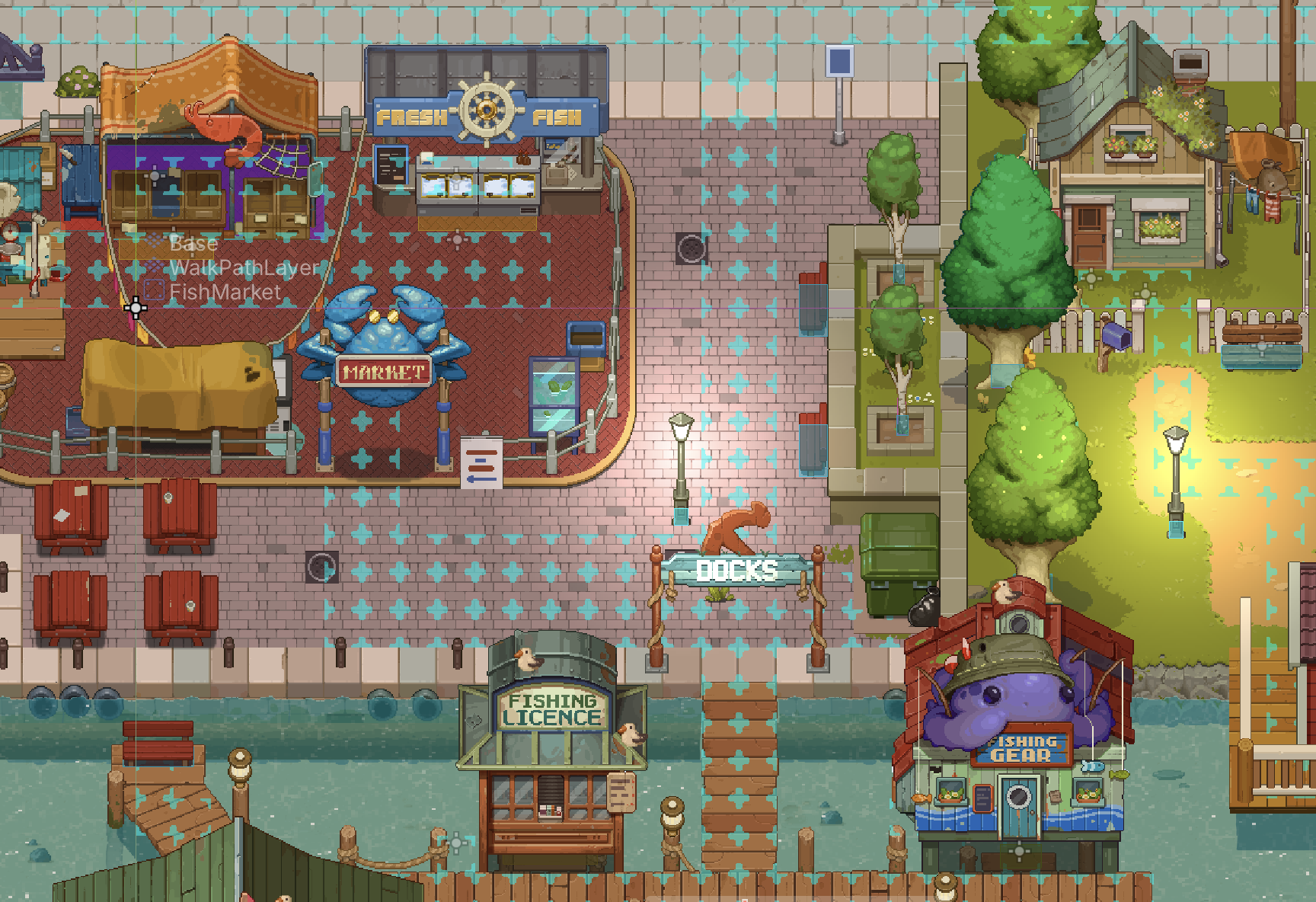
Before any NPC takes a step, each map needs to answer one question: which tiles can be walked on? That answer lives on a dedicated TileMapLayer called the walk-path layer — an invisible layer painted only where a character is allowed to stand. It doesn't render anything; it's pure data, a stencil laid over the visible art.
When a level finishes loading, its map controller reads that layer once and builds a Godot AStarGrid2D — the engine's built-in grid pathfinder — sized to match. Every tile the layer doesn't cover is marked solid:
# map controller — grid setup, runs once per level load
var used_rect = walk_path_layer.get_used_rect()
astargrid2d = AStarGrid2D.new()
astargrid2d.region = used_rect
astargrid2d.cell_size = walk_path_layer.tile_set.tile_size
astargrid2d.diagonal_mode = AStarGrid2D.DIAGONAL_MODE_NEVER
astargrid2d.update()

# any tile the layer never painted becomes solid ground
for x in range(used_rect.position.x, used_rect.end.x):
    for y in range(used_rect.position.y, used_rect.end.y):
        var tile_pos = Vector2i(x, y)
        if walk_path_layer.get_cell_source_id(tile_pos) == -1:
            astargrid2d.set_point_solid(tile_pos, true)
Diagonal movement is switched off deliberately — every route is a stack of horizontal and vertical hops, which keeps NPC walk-cycles honest (there's no "down-right" animation to fake). The result is a fresh grid per map, rebuilt whenever that map loads, that any NPC on it can query for a route.
3. What a schedule is made of
NPC routines aren't scripted per-character in GDScript — they're authored as JSON and loaded into three nested resource types:
NPCData— the NPC's identity: name, portrait, dialogue file, and a list of candidate schedules.NPCScheduleItem— one version of "today." Each item is matched against the current season, calendar date, day of week, or an active story event, with a plainis_defaultfallback. This is what lets the same NPC behave differently depending on the world state — for example, a vendor who fishes off the docks all spring and summer needs a completely different route once the lake freezes over in winter. Rather than branching inside one schedule, you just author a secondNPCScheduleItemscoped toseason: "winter"; the NPC picks whichever item matches today and ignores the rest.NPCScheduleCommand— a single instruction inside that day:GO_TO_LOCATION,SPAWN_ME, orREMOVE_ME, each stamped with a start time and a target map.
Here's Archibald's actual default schedule, trimmed to its shape:
{
  "id": "mayor", "name": "Archibald",
  "schedules": [{
    "is_default": true,
    "commands": [
      { "command": "GO_TO_LOCATION", "start_hour": 7,  "start_minute": 0,
        "map_name": "TownMap", "start_location": "EntryMayorHouse", "end_location": "EntryBakery" },
      { "command": "GO_TO_LOCATION", "start_hour": 9,  "start_minute": 15,
        "map_name": "TownMap", "start_location": "EntryBakery", "end_location": "EntryDocks1" },
      { "command": "GO_TO_LOCATION", "start_hour": 12, "start_minute": 30,
        "map_name": "TownMap", "start_location": "EntryDocks1", "end_location": "EntryParkStatue" },
      { "command": "GO_TO_LOCATION", "start_hour": 15, "start_minute": 45,
        "map_name": "TownMap", "start_location": "EntryParkStatue", "end_location": "EntryMayorHouse" }
    ]
  }]
}
start_location and end_location can be written either way: a named anchor, like "EntryBakery", or a raw tile coordinate, like [-17, 0]. The loader checks the JSON type and picks the right path:
if desc["start_location"] is String:
    command.start_location_anchor = desc["start_location"]
else:
    command.start_location = _vec2_from_json(desc["start_location"])
Anchors are the common case — every map drops small marker nodes in a shared location_anchor group, and when the level loads it converts each marker's world position into a walkable-grid tile, stored under its name. A schedule command resolves its anchor names to tile coordinates the moment it starts running, so a designer can drag the bakery's front door around in the editor without ever touching Archibald's JSON. Raw coordinates are the escape hatch for spots that don't need a named marker — the workshop owner's SPAWN_ME command just spawns him at tile [-17, 0] directly.
The JSON above is trimmed down to the fields that matter for routing — a real command carries a few more attributes that control how it looks and how it talks to the rest of the game:
- start_animation / end_animation — which animation to play the moment the command begins and the moment it finishes. A
GO_TO_LOCATIONcommand doesn't need to say "walk" explicitly; the mover already drives the walk cycle. These are for the animation on either side of the move — an idle pose to end on, a sit or work animation once Archibald reaches the bakery. - start_visibility / end_visibility — whether the NPC is shown or hidden the moment the command starts or ends. This is the cheap way to make an NPC disappear or reappear without spending a whole
REMOVE_ME/SPAWN_MEpair — if a shop owner just needs to vanish behind the counter for an hour and pop back up, one command'send_visibility: falsedoes it, instead of chaining separate remove/spawn commands. - start_group / start_group_method and end_group / end_group_method — a way to reach out from the schedule into arbitrary game code without the schedule system knowing anything about it. When a command starts or ends, it can call a named method on every node in a given group (
get_tree().call_group(group, method)). This is how, for example, a shop's "open" and "closed" state gets flipped from a schedule command instead of being hardcoded to a specific NPC — the command just names a group and a method, and whatever's listening in that group reacts.
Each command also carries a small state machine of its own — NEW → RUNNING → COMPLETED — and a day resets every command back to NEW before it's replayed. That's what lets the same JSON drive Archibald identically every day, and what the next section actually walks through.
4. Crossing map boundaries
Every command carries a map_name. The rule that drives everything else is simple: if a command's map_name matches the map currently loaded, that NPC needs to actually be present there, doing whatever the command says — walking a route for GO_TO_LOCATION, or appearing outright for SPAWN_ME. If it doesn't match, the NPC has no business being on this map at all, and stays despawned.
The one edge case is timing: a command's route is only computed the moment it starts running, but the player might walk onto that map minutes (or hours) after the command was actually due to start. That's handled by catching the NPC up rather than starting its walk late — covered below.
Archibald never leaves TownMap, so his day doesn't show the handoff directly — but an NPC who works inside a shop chains a GO_TO_LOCATION on the town map straight into a SPAWN_ME on the shop's interior at the door anchor they share, and a REMOVE_ME going the other way:
Workshop (interior) --REMOVE_ME--> Town Map --SPAWN_ME--> Bakery (interior)Getting that chain right — same anchor, times that line up — is entirely on the person authoring the JSON. Nothing validates that a door on one map lands where the matching door on the other map thinks it should.
What makes the seam disappear is catch-up interpolation. Say the player has been fishing since dawn and only walks into the bakery at 9:40 — twenty-five minutes after Archibald's GO_TO_LOCATION was due to start. Nothing was simulating him for those twenty-five minutes; the bakery interior wasn't even loaded. So the moment his schedule command starts running, it works out how late it is and fast-forwards his walk to match:
# schedule_executor.gd — on_current_command_start()
# how many in-game minutes have passed since this command was due
var start_minutes = current_command.start_hour * 60 + current_command.start_minute
var curr_minutes  = DateTimeManager.hour * 60 + DateTimeManager.minute
var minutes_pass  = max(0, curr_minutes - start_minutes)

polyline_mover.setup(path, npc, npc.npc_speed, minutes_pass, cell_size)
Inside the mover, that lateness gets converted into extra simulated ticks and burned through immediately, so Archibald doesn't teleport to the docks or start his 12:30 walk twenty-five minutes late — he's simply already most of the way there when the player rounds the corner, exactly as if he'd been walking the whole time.
5. The scheduler holding it together
Two pieces do the actual orchestration, one per NPC and one per level.
ScheduleExecutor lives on the NPC itself and runs every frame. It has one job: figure out which command should be active right now, and drive it.
# schedule_executor.gd — _process()
func _process(delta):
    if current_command == null or current_command.is_completed():
        check_next_command()   # close out the old command, open the new one
    else:
        execute_command(delta) # step movement, watch for arrival
"Which command should be active" isn't a queue pop — commands are sorted latest-first, and the executor walks that list looking for the newest one whose start time has already passed. That single rule handles every edge case for free: a fresh spawn mid-afternoon picks up wherever Archibald's day says he should be right then, not at the top of his schedule. Starting and finishing a command each fire a small set of hooks — swap the NPC's visibility, queue an end-of-command animation and dialogue line, optionally call a group method (the hook shops use to flip themselves "open") — so a GO_TO_LOCATION command is really "walk this route, then apply these side effects," and SPAWN_ME / REMOVE_ME are the same shape with no walk in between.
NPCManager lives on the level and answers the question ScheduleExecutor can't: should this NPC even be on this map? Every five in-game minutes — and once when a level first loads — it checks each NPC's currently active command against the level it's standing on:
# npc_manager.gd — spawn_new_npcs()
for npc_data in Databases.npcs:
    if spawned_npcs.has(npc_data.id):
        continue # already on this map

    var schedule = npc_data.get_current_schedule(...)
    var command  = schedule.commands[schedule.get_active_command_idx()]

    if command.map_name == level.name:
        var npc = load(npc_data.base_npc_scene).instantiate()
        npc.npc_data = npc_data
        spawned_npcs[npc_data.id] = npc
        level.add_child(npc)
That's the whole mechanism, stated plainly: an NPC only exists as a node when its currently-due command's map_name matches the map that's loaded. Walk into the bakery at 9:20 and the manager finds Archibald's active command pointing at TownMap, spawns him, and ScheduleExecutor immediately fast-forwards him into his walk. Leave, and eventually a REMOVE_ME command frees the node. Nobody simulated him while you were gone — the schedule data is the only thing that persisted, and it was enough.
Worth knowing before you lean on this
None of this is validated automatically. A developer authoring a schedule has to time every command by hand and chain them correctly across maps — matching anchors, lining up start times, making sure a REMOVE_ME on one map is picked up by a SPAWN_ME on the next. There are a few gatekeepers that catch obvious mistakes, like the load-time error when a location anchor sits off the walk-path layer, but those are dev-tooling conveniences, not a guarantee the whole chain is consistent — nothing stops two commands from disagreeing about where a door is or what time it opens.
And it's worth restating the core trick plainly: the system never simulates an NPC that isn't on the currently loaded map. There's no background clock ticking away Archibald's position while you're off fishing. It only ever fakes that continuity at the two moments it actually needs to — spawning him where his schedule says he should be, and interpolating him forward if he's arriving "late" — which is enough to make the town feel alive without ever running the town you can't see.
6. Closing the loop
None of the individual pieces here are exotic — a JSON schedule, a Godot AStarGrid2D, a constant-speed mover. What makes it work as a town is how deliberately the seams are hidden: anchors (or raw coordinates) so designers place doorways without fighting the data, catch-up interpolation so lateness looks like presence, and a spawn check that treats "not on this map" and "not simulated" as the same fact instead of fighting it. Archibald never really walked from his house to the bakery. He just needed to look like he had, exactly when someone was there to see it.